The Find X9 Ultra puts serious optical reach and recording control in a large phone. A practical look at who benefits, with the source video’s pre-release limits kept clear.
A distant subject is a useful way to discover what a camera phone can actually do. You cannot always walk closer to a building, a performer or an animal, and enlarging an ordinary photograph eventually runs out of detail. The OPPO Find X9 Ultra’s dedicated 10x camera addresses that familiar limitation. The more difficult question is how often you need it enough to carry a large, heavy handset every day.
The supplied video makes an enthusiastic case through travel photographs and recordings from southwest China. It also contains qualifications worth preserving: the presenter discloses a collaboration with OPPO, tests pre-release software and reports problems alongside the praise. Belliste uses those observations as one source of experience, rather than as independent proof that this is the best phone for everyone.
We have not tested the Find X9 Ultra ourselves. This review combines the supplied transcript with checked product information and examines the purchase through the trade between reach, recording control and everyday bulk. Hands-on findings remain attributed to the presenter, and early software behavior is not presented as a confirmed current retail defect.
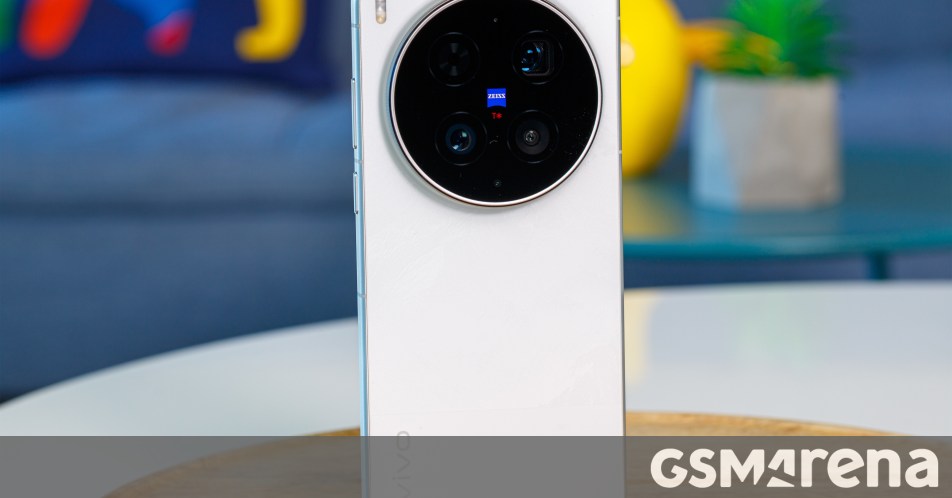
The Find X9 Ultra has four main image-taking rear cameras: a 200MP main, a 200MP 3x telephoto, a 50MP 10x telephoto and a 50MP ultrawide. An additional spectral sensor assists color measurement. Calling that a five-camera arrangement should not imply five interchangeable views of the scene.
In the video, the presenter notices a clear increase in detail when the longer optical camera takes over. He also likes the stability of distant recordings and the consistency when moving between views, although he points out visible transitions. These observations make a stronger case than an extreme digital-zoom number alone: the useful improvement occurs at a distance people may realistically photograph.
A 10x camera is particularly relevant when distance is fixed. A landscape detail across a valley or a performer viewed from the back of a venue can benefit without requiring an external lens. The presenter has not tested the optional teleconverter in this video, so its potential should not be folded into his hands-on verdict.
There are limits to what a long lens solves. It narrows the scene, making it harder to keep an unpredictable subject framed. Stabilization helps with camera movement, but it does not stop a person or animal moving during an exposure. A pleasing travel sample cannot establish that every dimly lit action photograph will work equally well.
For buyers, the useful exercise is to look through recent photographs and ask how many were spoiled because the subject was too far away. If that happens frequently, the additional lens has a clear job. If your favorite pictures are mostly taken around a table, the main and 3x cameras may matter much more than the headline feature.
The 200MP 3x telephoto provides a more everyday distance than the longest lens. Portraits, details and tighter travel compositions often sit closer to this range. The presenter emphasizes its substantial hardware, but his manufacturer-supplied light-intake comparisons are not a substitute for matching exposures and judging finished photographs.
We would assess it as a camera you might use repeatedly, rather than as a supporting act for the 10x. Try a face indoors, a subject against a bright background and a detail in softer evening light. Check whether the camera finds the intended focus and whether the result preserves the look you prefer.
The main camera also changes from the previous Ultra generation. OPPO describes a 1/1.12-inch sensor, smaller than the earlier one-inch format, paired with a wider aperture and newer imaging hardware. Sensor size alone does not settle whether that is an improvement or regression. Lens transmission, exposure choices and processing affect the photograph you receive.
That is why we would avoid making a purchase decision from either a smaller sensor label or a larger megapixel count. A crop of a static scene can demonstrate useful detail, while saying much less about movement, skin tones and repeated capture. The video provides attractive examples, but not a complete controlled camera comparison.
The presenter favors Hasselblad Master mode for its rendering of tone, color and shadows. He finds the photographs more satisfying than the default smartphone look. That is useful personal evidence, especially for buyers who dislike heavily brightened shadows, but it remains a preference rather than a universal definition of accurate photography.
OPPO positions Master mode as an alternative processing path with greater creative control. The practical question is whether it gives you results you want without making every picture feel like a project. Compare it with the standard mode on a familiar scene and examine the result on another display as well as on the phone.
XPAN makes a different kind of decision. Its wide frame encourages the photographer to organize a scene horizontally. The presenter acknowledges that a similar shape can be produced by cropping later, yet enjoys working with the format during capture. That is a fair reason to like it: a mode can influence how you compose without being a unique optical capability.
For ordinary ownership, learn one preferred style before collecting presets. A consistent, familiar setup is more useful when something happens quickly than a long menu of looks you have not tried. The strongest creative feature is often the one you can operate without interrupting the moment.
The presenter’s video enthusiasm centers on O-Log2, lens flexibility and the ability to use a LUT while recording. OPPO’s published launch information confirms O-Log2 and LUT preview or burn-in, with 4K/120fps and 8K/30fps available on the two 200MP cameras. Those recording options should not be generalized to every lens and special mode.
The difference between previewing a look and baking it into the file is consequential. A preview guides what you see during recording; a baked-in look changes what you take into editing. The presenter demonstrates a conversion look, but the transcript blurs these distinctions at times. Before an important shoot, inspect a short test file in the application you intend to edit with.
Log is most useful when you plan exposure and color handling deliberately. It does not automatically make an ordinary clip more attractive, and a flat-looking recording needs an appropriate viewing or editing path. Someone sharing quickly may prefer a standard recording mode rather than add work that brings little benefit to the final post.
The presenter also identifies restrictions in his portrait-video mode: 4K/30fps, no lens switching during a take and no simultaneous log capture. Those are reported behaviors of his pre-release software. They illustrate why one headline recording specification cannot describe the entire camera menu.
His complaint about the absence of a higher-quality editing codec is similarly a workflow concern. We would not turn his early account into a permanent current-format claim without rechecking the recording menu. If you need a specific codec, confirm it directly; resolution, frame rate, log profile and codec answer different questions.
The reviewer reports flicker around some bright artificial lights in low-light recordings, and says default exposure sometimes looks too bright. He also notes that OPPO is aware of issues on the unfinished software. That is relevant information, but a promised update is not evidence that a problem has been fixed.
The opposite assumption is equally weak. This video does not establish that the same issues remain on current retail software. We would use the observations to identify what to test: shop lighting at night, moving between bright and dark areas, and the balance between a face and the sky behind it.
The transcript’s suggested exposure adjustment is garbled. This article therefore does not reproduce it as a precise negative-EV recipe. In practice, inspect the highlights in the actual scene and make a measured adjustment if necessary. A fixed correction copied from a different environment can make another photograph worse.
These qualifications do not erase the strong footage the presenter shows. They set a sensible boundary around it. The camera system is ambitious, while the supplied video remains a snapshot of an early unit, a particular trip and a disclosed brand collaboration.
The Find X9 Ultra is not a compact alternative to carrying a camera. Its 6.82-inch display and approximately 235–236g weight make the size a meaningful part of the decision. The presenter enjoys the camera-inspired finish and finds the module useful as a finger rest, but those handling preferences may not survive your own case and grip.
He also likes the physical shutter control, while disabling its zoom behavior because he changes lenses accidentally. That is a valuable observation precisely because it concerns a small annoyance rather than a specification. A camera button is helpful when its position and sensitivity work with the way you hold the phone.
Try taking a photograph one-handed and then putting the phone back in a pocket. Repeat with the case you expect to use if possible. Those actions reveal more about whether the bulk will bother you than admiring the device on a table.
The display is sharp and large enough for inspecting pictures, but the maximum 144Hz setting needs qualification. OPPO specifies adaptive operation up to 120Hz, with 144Hz reserved for some gaming situations. It should not be described as a constant interface-wide refresh rate. Display comfort is also personal; eye-care modes and certifications do not guarantee freedom from discomfort.
The processor is Snapdragon 8 Elite Gen 5, correcting the inconsistent names in the transcript. The presenter finds applications and games responsive, yet also reports lower stability than the previous Ultra in a demanding graphics stress test. His quoted stability falls from 73.9% to roughly 55% on the early unit.
That result concerns performance retention during that test, rather than an average frame rate in every game. It cannot be used to say the phone loses the same proportion of speed in ordinary use. It does show why a strong opening benchmark and sustained behavior deserve separate attention.
For someone recording, editing and gaming extensively, current-software sustained testing is worth seeking. For someone mainly browsing and taking occasional photographs, the presenter’s comfortable everyday experience may be the more relevant observation. There is no need to make one test stand in for every workload.
The battery is 7,050mAh, not the ambiguous number in the automatic transcript. The presenter reports 51% remaining after 12 hours of YouTube streaming, compared with lower remaining percentages on the comparison phones. That is an encouraging result from his setup, rather than a standardized Belliste endurance measurement.
The transcript does not establish matched brightness, network behavior and all other test conditions. We therefore cannot translate the percentages into a universal runtime advantage or promise that a full day of camera use will leave the same reserve. Recording, navigation and streaming create different demands.
The phone supports 100W wired and 50W wireless charging with appropriate equipment. The reviewer also misses built-in magnetic attachment. A magnetic case can help attach accessories, but it should not be treated as proof of a particular wireless-charging certification or charging speed.
Plan the whole setup if charging convenience matters: the charger, the case, the mount and how the camera module fits around them. A large battery is useful; a charging arrangement that works with your desk or car is useful in a different way.
The Find X9 Ultra is compelling for someone whose photography repeatedly runs into the limits of distance and who wants meaningful recording control in the same device. The source video gives both qualities a persuasive demonstration, while its smaller complaints prevent the experience from being entirely frictionless.
It is less obviously the right purchase for someone who mostly wants automatic photographs and a comfortable everyday handset. The weight is permanent, while the 10x advantage may be occasional. A less specialized device could suit that routine even if it cannot reproduce the Ultra’s longest optical view.
The presenter did not know the final price when recording, so his expectation of premium pricing should not be presented as a verified current comparison. Match local storage, warranty and seller support before judging value. The best case for this Ultra is specific: you know the distant photographs or recording tasks it will help you make, and you are willing to carry the hardware that makes them possible.
The supplied video and transcript provide the attributed travel experience, early software observations and test results. The presenter discloses collaboration with OPPO. Hardware was checked against GSMArena and OPPO’s global specifications. Imaging and recording features were cross-checked with OPPO’s launch documentation. Belliste has not conducted hands-on testing, and no claim is made that pre-release issues have persisted or been resolved.
Yes. It has a dedicated 50MP 10x telephoto, alongside a separate 200MP 3x telephoto. Greater digital enlargement is not the same as another native optical focal length.
No. There are four main image-taking cameras plus an additional spectral sensor used for color measurement. The spectral sensor is not another ordinary framing option.
Its typical battery capacity is 7050mAh. The unclear number in the supplied automatic transcript should not be used as a different specification.
No. OPPO’s launch documentation attributes 4K/120fps and 8K/30fps to the two 200MP cameras. Check lens and mode restrictions for your intended recording setup.
No. The source presenter observed issues on pre-release software. His account does not establish whether those behaviors remain or have been resolved on current retail software.
It makes most sense for buyers who frequently need long-distance photography and advanced video controls, and who accept a large, heavy phone. Occasional use of those features may not justify the trade.