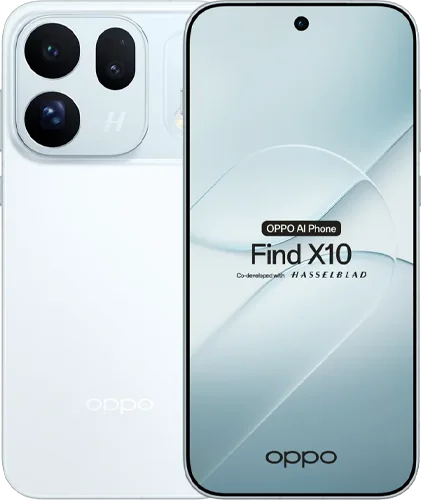
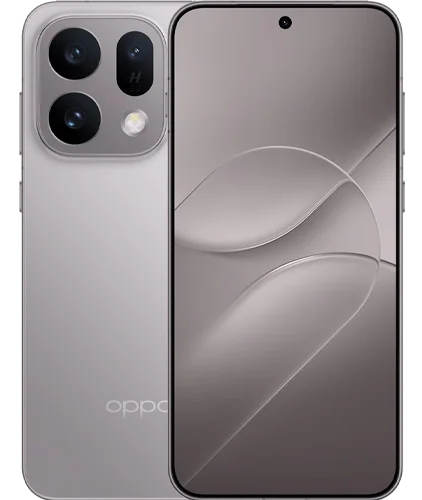
The most useful demonstration in this OPPO Find X10 video is not a camera sample. The presenter asks the phone to find his flight ticket, and it retrieves a file from Downloads before correcting the departure date he had remembered incorrectly. It is a small success, but one with an obvious consequence for someone traveling: the right information matters more than a fluent answer.
The same early account contains plenty for photographers, including two 200MP cameras, a telephoto the presenter particularly enjoys and recording tools intended for later editing. Together, these suggest a phone whose appeal is how much of a trip it can handle, from taking pictures to finding the documents needed to get home.
There is an important boundary around that enthusiasm. The presenter explicitly calls the video impressions after roughly a week, not his full review, and declines to judge gaming. Belliste has not tested the phone ourselves. This article combines his attributed experience with checked regional information and asks what the Find X10’s early strengths mean for everyday travel, without pretending that a week establishes long-term reliability.
A smaller travel companion, within reason
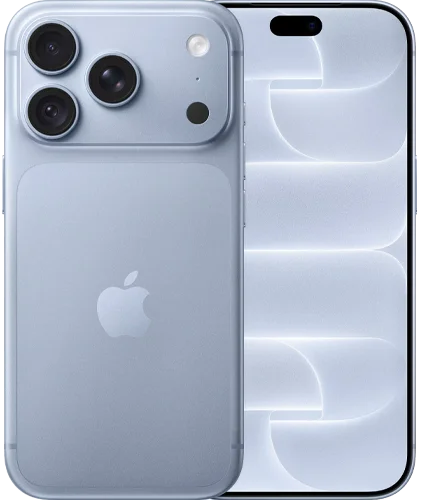
The presenter’s first reaction is to the handling. He finds the phone comfortable with one hand and likes the matte frame and sculpted glass flowing into the camera area. A handset that feels pleasant to take out repeatedly has a practical advantage on a trip, where navigation, messages and photographs interrupt each other constantly.
Its 6.59-inch display still makes it a substantial phone. “Compact” here is a relative judgment among modern flagships, rather than a promise that it suits someone seeking a genuinely tiny device. Try the grip with a case, especially if you expect to use the camera while carrying another bag or holding a ticket.
The presenter chooses to leave the included case off to preserve the feel. That is his preference, not a recommendation we would transfer automatically to another owner. Likewise, water-resistance and drop-test claims should not become an assurance that a phone cannot be damaged. Better protection is welcome when traveling; it does not make repairs irrelevant.
He finds the screen easy to see outdoors. One specification needs qualification: the advertised 144Hz maximum is available in some gaming situations, while OPPO lists adaptive refresh up to 120Hz otherwise. A responsive-looking display and good outdoor visibility are useful in their own right, without presenting the maximum as a constant operating mode.
The telephoto makes sightseeing more flexible
The Find X10 has a 200MP main camera, a 200MP 2.8x telephoto and a 50MP ultrawide, with a 50MP autofocus front camera. The camera count is less interesting than the distances it covers. You can include a landscape, frame an ordinary scene or isolate a detail without expecting one main sensor to do every job through cropping.
The presenter’s favorite is the telephoto. He likes the detail across his samples and finds the overall color rendering more natural than the heavy saturation and sharpening he dislikes in some phones. That is a useful account of taste and experience, rather than proof that the camera is always more accurate than competitors.
For travel, the telephoto has an immediate role. A detail on a roof, a person across a courtyard or a tighter mountain composition may benefit more from changing the framing than from adding another dramatic filter. The important question is whether its working distance fits your photographs. A 2.8x optical view is not equivalent to the dedicated 10x camera on the Find X9 Ultra.
We would also separate pleasant samples from dependable capture. The video does not establish a repeated test of moving people, difficult indoor lighting or rapid lens changes. If those situations account for most of your pictures, look for them specifically in longer reviews. A week of enjoyable photography is encouraging, while leaving those questions open.
The front camera offers another useful choice for groups and travel narration. A wider view can preserve the setting around a face, but placement still affects perspective. Check how people near the edges look and whether the framing remains comfortable when video stabilization changes the field of view.
One recording, more than one destination
The presenter highlights high-resolution recording from the two 200MP cameras, along with O-Log2 and Open Gate. OPPO also describes Open Gate on its product page. The practical appeal is the ability to keep more of the captured scene before deciding how the finished clip should be framed.
For someone sharing the same trip in a vertical post and a horizontal film, that can reduce the need to shoot everything twice. It does not make every crop equally good. You still need enough room around the subject, and a composition that looks balanced horizontally may need a different center of attention in a narrow vertical frame.
We would test the complete path before relying on it: record a short clip, move it into your editor, make both intended formats and examine the result. This checks more than the camera menu. It tells you whether the files play correctly, whether the crop retains sufficient detail and whether the extra flexibility is worth the storage and editing work.
O-Log2 solves another problem by giving an editing workflow more control over rendering. It should not be treated as an automatic improvement for every quick recording. Someone posting immediately may prefer the ordinary video mode, while someone already comfortable with color management has a clearer reason to use log.
The source video is enthusiastic about video quality but does not provide a long recording test, detailed autofocus comparison or a mode-by-mode compatibility matrix. Do not assume that Open Gate, the highest frame rate, every lens and every stabilization option can all operate together. Confirm the exact combination your project needs.
The AI demonstration works because it finds the source
The flight-ticket example is more persuasive than a generic chatbot conversation. The presenter describes a real file, a clear request and an answer that corrects his own mistaken date. That is a task in which the phone’s access to relevant information is as important as its ability to generate language.
It is also one successful example. The transcript does not show a series of confusing reservations, revised tickets or documents with similar names. We would not infer that Mind Pilot always chooses the latest booking or that its answer should replace checking the original ticket before departure.
A sensible way to use it is to let the assistant locate and summarize, then open the source when the detail matters. That still saves effort: finding a document buried in Downloads can be the difficult part. Verification need not erase the convenience of retrieval.
OPPO’s Manus partnership confirms that Agent Mode is intended to work with files, photos and multi-step tasks. The important distinction is between a request to retrieve information and a request to take an action. Finding a ticket is not the same as changing a booking, sending a document or completing a purchase. The supplied demonstration establishes the first kind of assistance, not every possible task implied by the word “agent.”
Availability also needs checking on the actual regional software. Language support, account requirements and the services enabled for a market can affect whether the demonstration translates to your own phone. Buy for a useful feature you can access, rather than a general expectation that an AI label includes every advertised scenario.
On-device processing does not mean every task stays offline
The transcript links the chipset’s AI hardware to local features, but that should not become a blanket claim about the whole assistant. A phone can perform some understanding or organization locally while using an external service for a more complex task.
OPPO’s published partnership information makes that division explicit. It says local file and photo tasks can keep original content on the device, while requests requiring external processing ask for confirmation before relevant material is shared. That is the manufacturer’s described behavior, not a Belliste privacy audit or proof that every feature works without a connection.
For personal travel documents, read what the specific request is asking to access and what the confirmation screen says. The useful question is not whether the phone has an NPU, but which information a particular task needs and where that task is processed. Hardware capability alone cannot answer it.
The presenter also likes AI photo-editing templates. Those are creative options rather than evidence that the original capture was better. Keep an unedited version of photographs you may want to revisit, and judge whether an effect suits the image rather than accepting it because it looks dramatic in a demonstration.
Battery life is the strongest early promise, with a regional catch
The reviewer describes an 8,000mAh version lasting around a day and a half to two days in his normal use. He is clear that he is not a gamer. That account is useful for understanding his experience, while leaving heavy gameplay, prolonged hotspot use and extensive recording untested.
Regional differences are substantial. GSMArena lists 8,000mAh globally and 7,150mAh for Europe, and OPPO’s UK specification confirms the latter. The larger-battery review unit’s runtime should not be presented as a measurement of the UK version. Check the local listing before treating battery life as the deciding reason to buy.
Both 80W wired and 50W wireless charging are listed. Those are maximum supported power figures, not promises for any charger you already own. The presenter receives an 80W adapter, a cable and a case, but box contents and promotions should be verified for the precise version you are ordering.
For a traveler, endurance has value beyond avoiding a cable. It leaves more freedom to use navigation, photograph frequently and keep a ticket accessible late in the day. We would still want a clear, longer test before promising a particular reserve after a demanding itinerary. The initial account supports optimism, not a guaranteed two-day schedule.
Smooth everyday use leaves the gaming question unanswered
The processor is MediaTek Dimensity 9600M, correcting the garbled name in the transcript. The presenter finds applications quick to open and multitasking comfortable, with fluid ColorOS 17 animations. Those are relevant everyday impressions for someone moving between maps, files, messages and the camera.
He deliberately does not judge gaming. That limitation should remain visible rather than be filled with assumptions from the flagship label. Sustained frame rates, heat and performance after an extended session require their own testing.
The six-year fluency language also deserves care. A claim about retaining a smooth experience is not the same as an explicit count of major Android upgrades or a security-patch policy. Confirm those commitments separately for your market if you intend to keep the device for years.
The early video does not establish long-term application compatibility, battery aging or how cleanly the AI features fit into a busy daily routine. Those are normal limits for first impressions. A useful article acknowledges them and identifies what to investigate, rather than treating missing evidence as either a hidden problem or a guaranteed success.
Belliste’s first-impressions verdict
The Find X10’s early appeal is that its strongest features can serve the same day: a comfortable phone for repeated handling, a flexible camera system for the trip and an assistant that may make scattered information easier to retrieve. The ticket example gives that last promise a practical shape that many AI demonstrations lack.
The case becomes weaker if you assume every positive applies universally. Battery capacity differs by market, an early camera selection is not a complete reliability test, and one successful assistant request does not establish broad autonomy. These are details to resolve before buying, not reasons to dismiss what the presenter enjoyed.
Because he did not know the final price when recording, the video cannot support a current value ranking. Compare the exact local storage version, battery, warranty and included equipment. For a buyer who wants capable photography and strong everyday endurance without choosing the largest model, the Find X10 deserves a closer look. A final recommendation should wait for the price and the remaining workload questions to line up with your own needs.
Sources and review basis
The supplied video and transcript provide the attributed week-long impressions, ticket-retrieval example and reported personal battery experience. Hardware and regional differences were checked against GSMArena, OPPO’s UAE specifications and UK specifications. Open Gate information was checked on OPPO’s product page, and Agent Mode processing claims against OPPO’s Manus announcement. Belliste has not conducted hands-on testing.