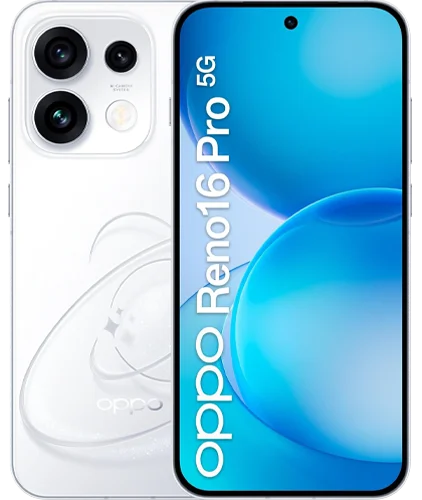
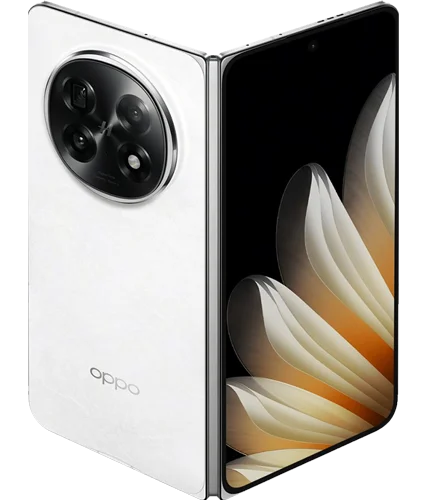
The most interesting question about the OPPO Reno16 Pro is what happens after everyone has gathered for a photograph. Can the people at the edge see whether they fit? Can you rescue the frame in which one person blinked? Can you record a walk without spending the evening correcting crooked footage? These are modest problems, but they affect how many pictures and clips are worth keeping.
The supplied reviewer approaches the phone in that spirit. His enthusiasm centers on the Bubble preview accessory, motion photos and small creative tools that make him want to use the camera more often. It is a different argument from claiming the best sensor or fastest processor: a phone may earn its place by making photography less awkward and more enjoyable.
This OPPO Reno16 Pro review follows the process of taking, choosing and sharing a picture. Belliste has combined the reviewer’s supplied account with checked specifications and accessory documentation. We have not used the phone ourselves. His impressions are attributed to him; the practical judgments and suggested checks are our analysis. The hardware discussed here is the international Reno16 Pro, rather than the different China-market model.
Start by getting everyone into the picture
The Bubble gives people in front of the rear cameras something they usually lack: a view of the composition. The reviewer finds himself using the accessory more often than expected, particularly for rear-camera selfies and group pictures. That reaction matters because an accessory can look entertaining in a demonstration yet become too much trouble to carry.
The practical benefit is shared visibility. A friend can adjust their position without waiting for instructions from someone holding the phone, and the person taking a selfie can use the rear camera while still checking the frame. It does not create a better photograph by itself. It removes some of the guesswork that can spoil one.
There is an important setup detail in OPPO’s documentation. For photographs, the Bubble initially fills its screen even if the phone is using a different aspect ratio. Double-tapping returns the preview to the original aspect ratio. That is worth learning before a group picture: a small display is only a useful framing guide when you understand what it is showing.
OPPO supplies a magnetic ring for attachment to a phone or case, and compatibility depends on the handset, region and software. The Bubble is an accessory to include in your purchase calculation, rather than something to assume is present in every Reno16 Pro box. Check the actual bundle and whether your chosen case suits the mounting arrangement.
We would also judge the phone without it. If you enjoy rear-camera selfies, the accessory has a clear job. If you normally photograph other people while looking at the main screen, its value becomes more occasional. A lively preview demonstration should not decide the whole handset purchase.
The front camera still has a useful job
The reviewer prefers the idea of rear-camera selfies with the Bubble attached, but that does not make the front camera redundant. The phone has a 50MP autofocus selfie camera with a 100-degree field of view. It remains the simpler option when you want to take a quick picture or speak to the camera without setting up an accessory.
One transcription error is worth resolving: the wide selfie setting is 0.6x, rather than 6x. It shows more of the scene; it is not a long-distance zoom mode. The reviewer likes how his face looks in the wider view during the walking demonstration, although that is a subjective impression of his framing rather than a controlled distortion comparison.
For group selfies, extra coverage makes it easier to include another person or preserve the surroundings. Position still matters. Try keeping faces away from the extreme edges and compare the wide setting with a slightly longer arm’s-length shot. A wide camera offers more options, but it cannot make every position equally flattering.
The useful choice is between convenience and control. Use the front camera when speed matters, and consider the Bubble with a rear camera when you have a reason to spend longer on composition. Neither approach needs to become a rule for every photograph.
Choose the moment after the shutter
Motion Photo is the feature the reviewer describes most convincingly as an everyday improvement. A short moving sequence accompanies the photograph, giving you another chance to select a better expression or moment afterward. For a group picture, the value may be as simple as finding an instant when everyone’s eyes are open.
That changes the pressure around taking the picture. Instead of asking several people to repeat a pose immediately, you can examine the captured sequence first. It is especially appealing when a moment is difficult to repeat, although it remains dependent on what was actually captured. If the subject was blurred or outside the frame throughout, choosing a different instant cannot recover a missing scene.
The transcript’s wording mixes still-frame export with video frame rates. We would keep those concepts separate: a still image has a resolution, while frames per second describes a moving sequence. The useful finding is the ability to choose another captured moment, without turning unclear wording into a promise about every export format or application.
There are ownership questions to check as well. Try sending the result through the messaging or social application you use most. Confirm whether the receiver gets a still, a video or the motion format you intended, and check how easily you can save the preferred frame. A feature that works beautifully inside the gallery can be less convenient once you leave it.
This is also where storage deserves attention. If you intend to collect motion sequences and record frequently, compare capacity before buying. The international specifications list 256GB or 512GB with no memory-card slot. You should not rely on adding a card later when your recording habit grows.
A camera system with more than one useful distance
The rear arrangement combines a 200MP main camera, a 50MP 3.5x telephoto and a 50MP ultrawide. Main and telephoto stabilization are listed in the specifications. That gives the phone a flexible starting point, but the supplied video is primarily a feature-led account, rather than a detailed examination of image quality across difficult scenes.
For a buyer, the telephoto matters because it changes the framing available from a fixed position. It can isolate a person across a room or pick out a travel detail without moving closer. The ultrawide offers the opposite choice when you cannot step back. Those differences are more useful to understand than simply counting megapixels.
The 200MP label does not establish how consistently the camera handles a moving child, mixed indoor lighting or bright lights at night. The reviewer’s enjoyment is relevant evidence about using the phone, but it is not a substitute for matched image comparisons. We would look at samples of the subjects you photograph most before paying a premium specifically for image quality.
A useful shop test is to move between the three views while framing the same scene. Check whether the change is quick, whether the color shifts distract you and whether the longer view focuses where you expect. Those checks assess the experience you will repeat more often than a full-resolution crop.
Give the photograph a look, then know when to stop
The reviewer’s preferred Pop Cam styles include Digicam, Instant Film and Light Leak. Their attraction is speed: choose a look during capture instead of opening a separate editor afterward. For someone who enjoys a consistent visual style, that can make the camera feel more inviting.
A preset also makes a creative decision for you. That may be exactly what you want for casual pictures, while a photograph of a product, document or unfamiliar place may benefit from a more neutral version. Before relying on a style for an important occasion, learn whether your chosen mode preserves an original you can edit differently later.
AI Remix Collage and Popout add another layer of experimentation. The reviewer likes the ability to turn several pieces of media into a composition or make a subject appear to extend outside its frame. Those tools concern presentation rather than proof of improved camera capture. A playful collage can be enjoyable even when the underlying photographs are ordinary.
The distinction is useful when judging value. Someone who already creates social posts may save time by doing more inside the gallery. Someone who prefers straightforward photographs may ignore these features after trying them once. Neither response is a failure to appreciate the phone; it simply changes which parts are worth paying for.
Walk with the camera before judging the video tools
The reviewer demonstrates movement on steps and likes the apparent stability and focus response. He also discusses horizon correction and dual-view recording. The first aims to keep footage more level, while the second includes the person filming and the scene in the same recording. They solve different problems and should be assessed separately.
For a walking clip, a level horizon is helpful, but it is not the whole stabilization result. Watch for sudden shifts, changes in framing and what happens around the edges during a turn. Examine the same behavior in lower light if you often record evenings out. The supplied daylight demonstration cannot settle performance in every environment.
Dual-view recording has a more specific use: preserving a reaction without cutting away from the event. A travel presenter or someone recording a family surprise may find it useful. For footage you intend to edit extensively later, check whether the saved layout and resolution fit the way you work.
The international phone lists 4K recording at 30 or 60fps for front and rear cameras. That does not establish that every special mode can be combined with every resolution, frame rate or lens. Test the exact combination you want, rather than infer full compatibility from the headline recording specification.
The phone around the camera still matters
The 6.32-inch body is a recurring positive in the reviewer’s account. He finds it easy to hold and comfortable to carry. A smaller phone can make spontaneous photography easier simply because it is less cumbersome to take out and use. The decorative back matters less once a case or accessory covers it, though the reviewer appreciates the alternative black finish.
The AI Snap Key is another convenience whose usefulness depends on your habits. The presenter describes his software’s assignments for screenshots, voice recording and AI Mind Space, and likes being able to customize it. Check the assignments available on your own software version. A shortcut becomes valuable when it removes a step you repeat, rather than merely adding another button to remember.
The specification lists the processor as Dimensity 8550 Super, with 12GB RAM. The reviewer finds general use smooth, but the video supplies no sustained gaming measurements, prolonged recording test or detailed thermal comparison. It is reasonable to take his responsiveness impression seriously without converting it into a performance ranking.
Battery capacity also depends on region: 6,700mAh internationally and 6,000mAh in Europe, with 80W wired charging. The video discusses the larger version and offers reassurance rather than a measured runtime. That is insufficient to promise two-day endurance, particularly for someone recording and editing heavily.
Six-year fluency is a different claim from six years of updates
The presenter mentions six-year fluency protection while describing ColorOS 16. That wording concerns the longevity of a performance experience; it should not be rewritten as a promise of six major Android upgrades. A software-support policy needs its own explicit terms.
For a long-term purchase, ask about operating-system upgrades and security patches separately, in the market where you are buying. A smoothness claim does not answer how long a device receives security fixes, just as a support commitment does not guarantee that every application will feel unchanged years later.
The same discipline applies to AI tools. The reviewer names organization, translation and expense-related features, but their usefulness depends on the languages, services and software available to you. Choose the phone for a workflow you can verify rather than a list of tools you might eventually discover a use for.
Belliste verdict: easier pictures are the strongest argument
The Reno16 Pro is most interesting when considered as a small camera workflow. The Bubble helps with framing, motion capture gives you another chance at the right expression, and built-in styles make sharing more immediate. The reviewer’s enthusiasm comes from that combination, and it is more persuasive than treating every added mode as an independent reason to upgrade.
Our reservation is that enjoyment does not settle the whole purchase. Verify the total phone-and-accessory price, the regional battery specification and the recording combinations you need. If the Bubble is the main attraction, also check whether your existing compatible phone can use it before assuming a new handset is necessary.
For someone who enjoys photographing friends, making travel clips and experimenting without a separate editing setup, the Reno16 Pro has a coherent appeal. The best reason to buy it is that its tools make taking and keeping your pictures easier. The presence of those tools alone cannot decide whether it is the best camera phone for your money.
Sources and review basis
The supplied video and transcript provide the attributed handling impressions and creative-feature discussion. International hardware and regional battery differences were checked against GSMArena’s specifications. Feature names, the 0.6x selfie view and fluency wording were checked against OPPO’s regional product page. Attachment, compatibility and preview behavior were checked against OPPO’s Bubble documentation. Belliste has not carried out hands-on or laboratory testing.