OpenVoice V2: A Professional Guide to Open-Source Voice Cloning and Voice Conversion
Published:
A technical guide to MyShell OpenVoice V2 for zero-shot cross-lingual voice cloning, style control and self-hosting.
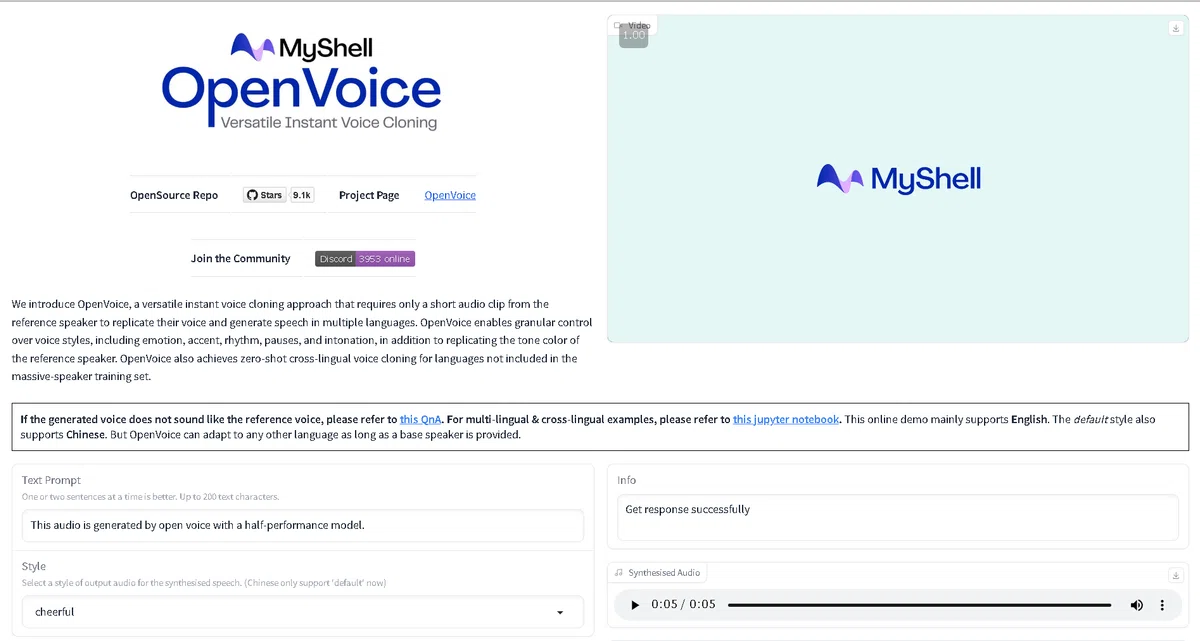
Most voice cloning tools are hosted services with monthly fees and usage meters. OpenVoice V2 is different. It is an open-source instant voice cloning model from MyShell that you can download, run on your own hardware, and use commercially under the MIT license.
This guide explains what OpenVoice V2 is, how its cloning and tone color conversion work, how to set it up, and what to weigh before you rely on it. To compare it with other tools, browse our Voice Cloning & Voice Conversion category.
What Is OpenVoice V2?
OpenVoice is an instant voice cloning approach developed by MyShell. OpenVoice V1 appeared in December 2023, and OpenVoice V2 followed in April 2024. According to the project documentation, V2 includes everything in V1 and adds three improvements:
Better audio quality through a different training strategy
Native multilingual support for English, Spanish, French, Chinese, Japanese, and Korean
Free commercial use, since both V1 and V2 are released under the MIT license
The project reports that the underlying cloning technology has powered the instant voice cloning feature on myshell.ai since May 2023. The project also notes that the open-source release only approximates MyShell's internal version, and that the online product has better audio quality, similarity, naturalness, and efficiency. The code is on GitHub, and the model is on Hugging Face.
Voice Cloning vs. Voice Conversion in OpenVoice
OpenVoice works by separating what is said from how the voice sounds. A base speaker model produces speech, and a tone color converter then applies the tone color of a short reference clip. That design makes OpenVoice useful for both jobs:
Voice cloning: generate new speech in the reference speaker's tone color from text.
Voice conversion: take existing speech and change its tone color to match a reference speaker.
In V2, the base speech is generated with MeloTTS, which you install alongside OpenVoice. Check the official demo notebooks for the exact workflow.
Core Capabilities
Capability
What it does
Accurate tone color cloning
Reproduces the reference speaker's tone color from a short clip
Zero-shot cross-lingual cloning
Speaks languages that are not in the reference clip or the training set
Native multilingual support
English, Spanish, French, Chinese, Japanese, and Korean in V2
Flexible style control
Adjust emotion, accent, rhythm, pauses, and intonation
MIT license
Free for commercial use, per the project
Self-hosting
Run locally or on your own servers, with no per-minute fees
Demo notebooks
Examples for style control, cross-lingual cloning, and V2 usage
Style control is described mainly in the V1 documentation, and V2 builds on it, so test which controls work in your setup.
Typical Use Cases
Developers and researchers: a transparent base for voice experiments
Indie creators: voiceovers without subscription costs
Localization: one voice across several supported languages
Games and apps: characters and assistants with custom voices
Prototyping: quick tests before committing to a paid service
Education: teaching how voice cloning works, using open code
Privacy-sensitive projects: keeping audio on your own machines
Who OpenVoice V2 Fits Best
OpenVoice suits developers, researchers, and technical creators who value control, privacy, and zero licensing cost. It is less ideal for non-technical users who want a polished web studio, for teams that need guaranteed support, or for projects that require the very highest fidelity.
Need
Better fit
Free, self-hosted cloning with a permissive license
OpenVoice V2
Newer open model with 23+ languages and watermarking
Chatterbox Multilingual
Hosted cloning from tiny samples, plus open models
Fish Audio
Polished studio with a large ecosystem
ElevenLabs
Ultra-low-latency real-time voice
Cartesia Sonic
Step-by-Step: Set Up and Use OpenVoice V2
1. Confirm you have the rights. Clone only your own voice or one you have explicit written permission to use.
2. Prepare a clean reference clip. Use a short recording of one speaker in a quiet room, with no music or echo. If the output does not sound like the reference, the project's Q&A page offers troubleshooting tips.
3. Create an environment. The project recommends a dedicated Python environment, for example with conda and Python 3.9.
4. Install OpenVoice. Clone the GitHub repository and install it in editable mode, following the README.
5. Download the V2 checkpoints. Get the model files from the official Hugging Face page.
6. Install MeloTTS. V2 uses MeloTTS for the base speech, so install it from the MyShell repository, plus any required language data.
7. Run the demo notebook. Open the V2 demo notebook (`demo_part3.ipynb`) to see the full flow, then adapt it to your own text and reference audio.
8. Test and refine. Try several reference clips and languages, then listen for pronunciation, naturalness, and similarity. You can also try the official Hugging Face demo before installing anything.
Safety, Consent, and Legal Considerations
Open-source cloning has no built-in gatekeeper, so responsibility rests entirely on you. MyShell states that it reserves the ability to detect whether audio was generated by OpenVoice, but you should not rely on that as a safeguard. Follow these rules:
Never clone a voice without explicit permission.
Do not use cloned voices to impersonate, defraud, or mislead anyone.
Disclose AI-generated audio where it could confuse listeners.
Keep records of consent for every voice you clone.
Check local laws on likeness, publicity rights, and disclosure.
Secure your reference recordings and generated files.
This guide is not legal advice. Consult a qualified professional for commercial or high-risk use.
Pricing and Cost Model
OpenVoice V2 itself is free. Per the project, V1 and V2 are MIT licensed and free for commercial use. Your real costs are:
Compute: a GPU or cloud instance for faster inference
Engineering time: setup, testing, and maintenance
Quality work: curating reference audio and fixing pronunciation issues
Compliance: consent processes and legal review
Check the repository's license file before launch, because licensing details on third-party Spaces and forks can differ from the official project.
Best Practices
Use clean, single-speaker reference audio with natural speech.
Test several reference clips, since similarity can vary a lot.
Evaluate each language you plan to ship with native speakers.
Start with the official demo notebooks before customizing code.
Pin versions of OpenVoice, MeloTTS, and dependencies for stable results.
Compare against newer open models if you need more languages or expressiveness.
Keep consent records and avoid sensitive impersonation scenarios.
Review the license and repository updates before commercial release.
Final Thoughts
OpenVoice V2 is one of the most accessible ways to experiment with high-quality voice cloning. It is free, MIT licensed, self-hostable, and flexible enough for cloning, cross-lingual speech, and tone color conversion. For developers, researchers, and privacy-conscious creators, that combination is hard to beat.
The trade-offs are real. Setup takes technical skill, language coverage is narrower than newer models, the open release is not as polished as MyShell's hosted version, and there is no built-in consent verification or support desk. Start with your own voice, run the official demos, and decide whether the quality fits your project before committing. Ready to try it? Explore OpenVoice on GitHub.
What is OpenVoice V2?
OpenVoice V2 is an open-source instant voice cloning model from MyShell, released in April 2024. It clones a speaker's tone color from a short clip and can speak multiple languages. See the official GitHub repository.
Is OpenVoice V2 free for commercial use?
According to the project, both V1 and V2 are released under the MIT license and are free for commercial use. Confirm the license file in the official repository before launch.
Which languages does OpenVoice V2 support?
V2 natively supports English, Spanish, French, Chinese, Japanese, and Korean. Try it in the official Hugging Face demo.
Does OpenVoice support voice conversion?
Yes. It uses a tone color converter that applies a reference speaker's tone color to generated or existing speech.
What is zero-shot cross-lingual voice cloning?
It means the model can speak a language that does not appear in the reference clip or the training dataset while keeping the reference voice's tone color.
How much audio do I need to clone a voice with OpenVoice?
OpenVoice is designed for instant cloning from a short audio clip. Cleaner reference audio generally gives better results.
Do I need a GPU to run OpenVoice V2?
You can run it on a standard machine for experiments, but a GPU makes inference faster. Check the official repository for current requirements.
Can I clone someone else's voice?
Only with their explicit permission. Using a cloned voice to impersonate or mislead people is unethical and may be illegal.
Best Free AI Tools in 2026: What You Get and What’s Limited